
Fonality HUD Mobile(v3)3.7.0.5.7965 - Get APK
You'll be able to download in few seconds.
Publisher Description
Communicate, Collaborate and Connect from Anywhere
Now with built-in softphone capability for completing calls via Wi-Fi or your iPhone’s data connection.
Fonality’s HUD Mobile allows you to take control and command of your business communications into
the palm of your hand. We deliver access to the same telephony features you enjoy in our HUD desktop
application on your smartphone, so you can experience a seamless transition from the office to the
road. HUD Mobile is easy to use and painless to manage. It increases employee productivity and
responsiveness no matter where they roam.
HUD Mobile is available for free for use with supported versions of Fonality’s business phone system.
After the HUD Mobile App is enabled in your Fonality system and installed on your Android phone, you
will be able to log into HUD from anywhere and communicate as if you were still at the office.
With HUD Mobile you can:
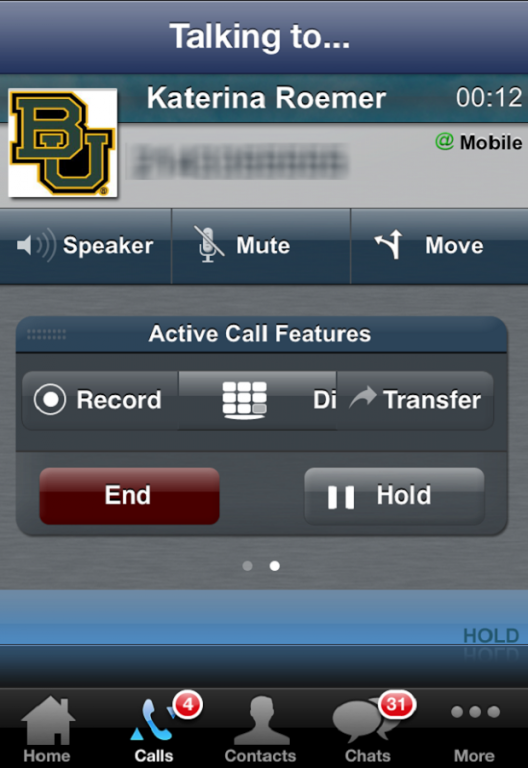
Make and receive office calls using your extension and office caller ID
Use the device you love most - your own!
Have HUD always running in the background so you never miss a call or chat
Use visual voicemail to see who left a message, when, and how long the message is
Keep your mobile number private
Chat with secure instant messaging
Easily slip into conference bridges
Put calls on hold, transfer them to others, or to your own office phone
Coach staff with barge, monitor, or whisper
Be reached when you want - you control when you're available
Monitor contact center queue activity and participate in queues form anywhere
In today’s always-on, mobile, and distributed work culture, Fonality clients remain responsive,
productive, and connected inside the office or out.
HUD Mobile must be used in conjunction with an eligible Fonality business phone system. Your
username is usually your server ID, followed by an underscore and your extension. For example
11111_5555.
To learn more about Fonality’s phone systems for business, visit www.fonality.com or call 1-877-
FONALITY.
Details and Requirements:
Calls are completed over the carrier network.
HUD Mobile supports Android phones running 4.1 or greater.
PBXtra, trixbox, Connect, Connect+, and EntPayGo customers must be on Fonality Control Panel version
12.8 or higher. PBXtra and trixbox customers who have not updated, will need to proactively update to
version 12.8 or higher, by selecting the “Upgrade” link in the Control Panel.
Fonality Terms of Use: http://www.fonality.com/terms
Fonality Privacy Policy: http://www.fonality.com/legal/privacy-policy
Please visit fonality.com/support for assistance.
Do you love HUD Mobile? If so, we’d be grateful if you share the joy by giving it a 5 start rating.
About Fonality HUD Mobile(v3)
The company that develops Fonality HUD Mobile(v3) is Fonality. The latest version released by its developer is 3.7.0.5.7965.
To install Fonality HUD Mobile(v3) on your Android device, just click the green Continue To App button above to start the installation process. The app is listed on our website since 2016-04-19 and was downloaded 0 times. We have already checked if the download link is safe, however for your own protection we recommend that you scan the downloaded app with your antivirus. Your antivirus may detect the Fonality HUD Mobile(v3) as malware as malware if the download link to com.fonality.hudm is broken.
How to install Fonality HUD Mobile(v3) on your Android device:
- Click on the Continue To App button on our website. This will redirect you to Google Play.
- Once the Fonality HUD Mobile(v3) is shown in the Google Play listing of your Android device, you can start its download and installation. Tap on the Install button located below the search bar and to the right of the app icon.
- A pop-up window with the permissions required by Fonality HUD Mobile(v3) will be shown. Click on Accept to continue the process.
- Fonality HUD Mobile(v3) will be downloaded onto your device, displaying a progress. Once the download completes, the installation will start and you'll get a notification after the installation is finished.
Program Details
System requirements
Download information
Pricing
Version History
version 3.7.0.5.7965
posted on 2016-04-19
Added support for devices running Android 6 (Marshmallow).
Disclaimer
External Download
We do not host Fonality HUD Mobile(v3) on our servers. We did not scan it for viruses, adware, spyware or other type of malware. This app is hosted by Galad and passed their terms and conditions to be listed there. We recommend caution when installing it.
The APK Download link for Fonality HUD Mobile(v3) is provided to you by apps112.com without any warranties, representations or guarantees of any kind, so access it at your own risk.
If you have questions regarding this particular app contact the publisher directly. For questions about the functionalities of apps112.com contact us.
